AI-based Threat Detection - Part 3: N-gram Network ADS

Third time lucky! You cannot get luckier than n-gram anomaly detection. It is one of the simplest, yet still effective, anomaly detection approaches. So, exactly how simple is it?
What's N-grams?
I used to LOVE a tool called SALAD for finding anomalies in log files. The site doesn't seem to exists anymore - but it was an effective, lightweight anomaly detection tool.
SALAD may refer to Split Active Learning/ Semantic Aware Logical Anomaly Detector.
 chwress
Possibly the original code I'm referring to above.
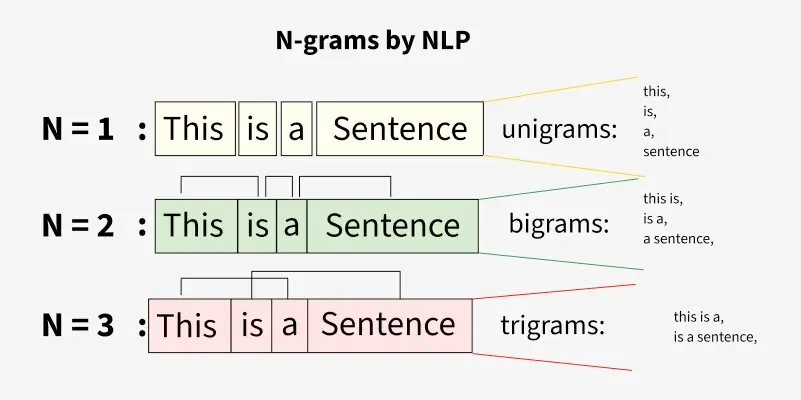
So, n-grams is essentially taking the various patterns found in a corpus of text and performing a statistical analysis. So, the more a pattern reoccurs, the less anomalous the data. When outlier (unseen) patterns occur in text, the data record is anomalous.
N - represents the window size (contiguous sequence) of characters or words used.
It can be used for as my son says "eezee peezee lemon squeezee" language models:
 Author AIML.com
Ok, show me,...
Let's go for that! Firstly, we need some training data - how about Trump speeches:
ryanmcdermott
Then roll-your-own or download my (Claude Code generated) tool (NGdetect.py):
art-of-defence
Right, then let's train the n-grams model on Trump speeches (using the above):
python3 NGdetect.py train --input speeches.txt --model trump.pkl \
    --n 8 --threshold 0.30 --error-rate 0.01
[train] Extracting 8-grams from 4,260 strings …
[train] Done in 0.81s | unique n-grams: 314,689 | Bloom size: 368.2 KB | estimated FP rate: 1.0039%

=======================================================
 N-Gram Anomaly Detector — Model Summary
=======================================================
  N-gram length       : 8
  Anomaly threshold   : 30% unseen
  Training strings    : 4,260
  Unique n-grams      : 314,689
  Bloom filter size   : 368.2 KB
  Bloom k (hashes)    : 7
  Bloom FP rate (est.): 1.0039%
=======================================================
[save] Model written to trump.pkl (736.7 KB)
Then, let's grab an Obama speech and compare it to Trump's speech (trump.pkl):
python3 NGdetect.py score " stand here today humbled by the task before us, grateful for the trust you have bestowed, mindful of the sacrifices borne by our ancestors." --model trump.pkl
Score : 66.1700%  [ANOMALY]
Total n-grams  : 133
Unseen n-grams : 88
Unseen sample  : [' stand h', 'stand he', 'tand her', ' today h', 'today hu', 'oday hum', 'day humb', 'ay humbl', 'y humble', ' humbled']
Just for the record, n=8 is high. However, I knew the result when I saw "humbled". :)
What does this have to do with networks?
Well, let's find out. I created a set of C tools for network (Netflow v9) traffic capture. Additionally, I created protocol analysers for common protocols, like DNS and HTTP.
art-of-defenceHere is the output of the detailed help for nf-dump:
nf_dump - NetFlow v9 CSV flow logger
=====================================
Captures IPv4 network traffic (live or from a PCAP file) and writes
aggregated NetFlow v9 records to a CSV log file in real-time.

USAGE
  Live capture (requires root):
    sudo ./nf-dump [-i <iface>] [-f <out.csv>] [-c <pkts>] [-t <secs>] [-u <hz>]

  Offline PCAP replay:
    ./nf-dump -r <input.pcap> [-f <out.csv>] [-c <pkts>]

OPTIONS
  -i <iface>
      Network interface to capture on (e.g. eth0, ens3).
      Defaults to the first available interface if omitted.
      Mutually exclusive with -r.

  -r <file.pcap>
      Read packets from a PCAP file instead of a live interface.
      Supports Ethernet (DLT 1), Linux cooked (DLT 113/227),
      raw IP (DLT 12/14), and BSD loopback (DLT 0/108).
      Mutually exclusive with -i.

  -f <out.csv>
      Path to the output CSV file. Created or truncated on start.
      Default: netflow_v9.csv

  -c <N>
      Stop processing after N packets have been captured/read.
      Default: 0 (unlimited).

  -t <N>
      Stop after N seconds of wall-clock time (live mode only).
      Default: 0 (unlimited).

  -u <N>
      How often (in seconds) active flows are rewritten to the CSV
      during live capture. Lower values give more up-to-date output
      at the cost of more disk I/O. Default: 1.
      Not used in offline mode (all flows flushed at EOF).

  -h          Print brief usage and exit.
  --help      Print this detailed help and exit.

DNS LOG (dns.log)
  Written automatically alongside the flow CSV. One row per DNS
  question record found in UDP port 53 traffic (queries and responses).
  Columns:
    seq         Row sequence number
    timestamp   ISO-8601 UTC timestamp of the packet
    src_ip      Source IPv4 address
    src_port    Source UDP port
    dst_ip      Destination IPv4 address
    dst_port    Destination UDP port
    msg_id      DNS message ID
    direction   query | response
    opcode      DNS opcode number
    rcode       NOERROR | NXDOMAIN | SERVFAIL | REFUSED | ...
    questions   Question count in the DNS message
    answers     Answer count in the DNS message
    qname       Queried domain name
    qtype       A | AAAA | MX | CNAME | TXT | PTR | SRV | ...
    qclass      Query class (usually 1 = IN)

HTTP LOG (http.log)
  Written automatically. One row per HTTP request or response
  detected on TCP ports 80, 8080, 8000, 8888, 3000.
  Uses per-stream TCP reassembly so multi-segment messages
  are handled correctly.
  Columns:
    seq              Row sequence number
    timestamp        ISO-8601 UTC of the packet
    src_ip/port      Sender address and port
    dst_ip/port      Receiver address and port
    direction        request | response
    method           GET | POST | PUT | DELETE | HEAD | ...
    uri              Request URI (requests only)
    http_version     HTTP/1.0 | HTTP/1.1 | HTTP/2
    host             Host: header value
    status_code      Response status (e.g. 200, 301, 404)
    reason           Response reason phrase
    user_agent       User-Agent header value
    referer          Referer header value
    content_type     Content-Type header value
    content_length   Content-Length header value
    location_or_server  Location (responses) or Server header

OUTPUT FORMAT
  The CSV file has one row per aggregated flow (5-tuple key).
  Columns:
    flow_id      Monotonically increasing flow sequence number
    src_ip       Source IPv4 address
    src_port     Source port (0 for ICMP/IGMP)
    dst_ip       Destination IPv4 address
    dst_port     Destination port (0 for ICMP/IGMP)
    protocol     TCP | UDP | ICMP | IGMP | OTHER
    tos          IP Type-of-Service byte (decimal)
    tcp_flags    Accumulated TCP flags: SYN|ACK|FIN|RST|PSH|URG or -
    packets      Total packet count for the flow
    bytes        Total IP payload bytes for the flow
    first_seen   ISO-8601 UTC timestamp of the first packet
    last_seen    ISO-8601 UTC timestamp of the last packet
    duration_ms  Flow duration in milliseconds

  Rows are fixed-width (space-padded) so active flows can be updated
  in-place with fseek without rewriting the entire file.

FLOW LIFECYCLE
  A new CSV row is written immediately when the first packet of a
  5-tuple is seen. Subsequent packets update packet/byte counts and
  the last_seen timestamp. Flows idle for >30 seconds are expired
  (their slot is freed and the final row is committed to disk).
  All remaining active flows are flushed on exit or Ctrl-C.

EXAMPLES
  # Capture on eth0, write to /var/log/flows.csv:
  sudo ./nf-dump -i eth0 -f /var/log/flows.csv

  # Analyse an existing PCAP file:
  ./nf-dump -r capture.pcap -f flows.csv

  # Live capture, stop after 60 seconds, update CSV every 2s:
  sudo ./nf-dump -i eth0 -t 60 -u 2 -f session.csv

  # Monitor the live CSV in another terminal:
  watch -n 2 'tail -20 netflow_v9.csv'
Let's use NGdetect.py to train a model to detect URL anomalies. First, get a dataset:
ada-url
Then let's run the top100 (txt) into the model to train on normal URL patterns:
python3 NGdetect.py train --input ./datasets/url/top100.txt --model url.pkl --n 5 --threshold 0.20 --error-rate 0.01
[train] Extracting 5-grams from 100,025 strings …
[train] Done in 2.83s | unique n-grams: 791,801 | Bloom size: 926.4 KB | estimated FP rate: 1.0039%

=======================================================
 N-Gram Anomaly Detector — Model Summary
=======================================================
  N-gram length       : 5
  Anomaly threshold   : 20% unseen
  Training strings    : 100,025
  Unique n-grams      : 791,801
  Bloom filter size   : 926.4 KB
  Bloom k (hashes)    : 7
  Bloom FP rate (est.): 1.0039%
=======================================================
[save] Model written to url.pkl (1853.2 KB)
Let's test our detector (thereafter you can incorporate it into the live capture).
python3 NGdetect.py score "http://bank0famerica-com.z2.newmail.ru/secure_membin_BankOfAmeri_caemail_id43432gjg98987ihgwq72k9878e.htm?securelogin=yes?ssl_encryptlink=yes&source=bankofamericaEMAILdefaultaspx?refererident=341348B3767313d1683678CADD124HJ8S748FGHHJC1AjkCB&cookieid=43562714&nocachelocal" --model url.pkl
Score : 61.6500%  [ANOMALY]
Total n-grams  : 279
Unseen n-grams : 172
Unseen sample  : ['bank0', 'ank0f', 'nk0fa', 'k0fam', '0fame', 'om.z2', 'm.z2.', '.z2.n', 'z2.ne', '2.new']
Great, it looks like it works on the obvious phishy stuff,...
JPCERTCCConclusion
I'll write an article on all model performances once tested in a live environment - subscribe to be notified.
As always, if I got anything wrong,...

References
The following websites serve as appropriate references for additional detail:
Author AIML.comchwressart-of-defence