AI-based Threat Detection - Part 1: Bayesian Classification

This is a new series of posts I'll be doing on AI-based Threat Detection. Let's kick things off with my all time favourite - Bayesian Classification. Specifically, we will use Naive Bayes to build the model. Thereafter, we will evaluate the model. The entire exercise took me less than an hour - so, I strongly recommend you build it yourself.
So, lets dive in. Firstly, we will need the following:
- Script to train and build our AI model.
- Script to run and evaluate our AI model.
- Labelled dataset to train the AI model.
It's important to select a good training dataset. The basic laws of the universe apply, specifically - garbage in = garbage out. The better your data the better your model.
What is Bayes?
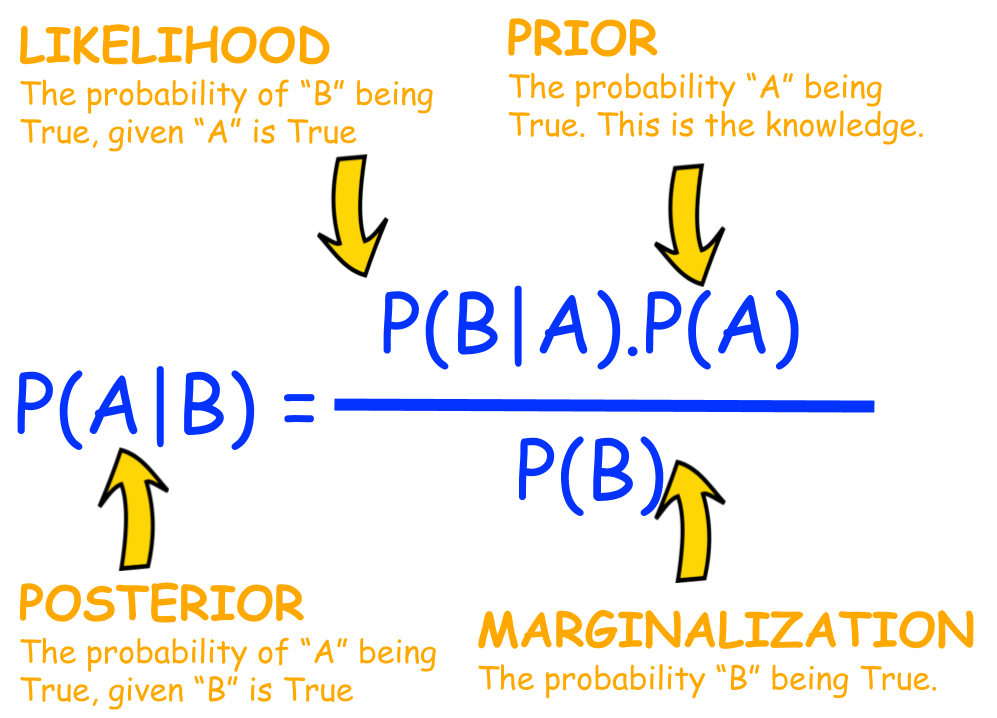
Bayes theorem is named after Thomas Bayes. It's essentially the probability of something happening, like an event or condition being met. For example, if I give you a fruit that's yellow, elongated with potassium - what's the probability it's a banana?
How does it help us?
Well, if we train a Naive Bayes classifier with IoC (indicator of compromise)and IoA (indicator of attack) labelled data we could use the model to detect malicious traffic.
How do we do it?
Well firstly it's important to identify, collect or synthesize labelled datasets to train the model. The following dataset seemed quite useful and fulfills our training requirement:
Let's take a look-see inside the data for a better understanding:
FLOW_START_MILLISECONDS,FLOW_END_MILLISECONDS,IPV4_SRC_ADDR,L4_SRC_PORT,IPV4_DST_ADDR,L4_DST_PORT,PROTOCOL,L7_PROTO,IN_BYTES,IN_PKTS,OUT_BYTES,OUT_PKTS,TCP_FLAGS,CLIENT_TCP_FLAGS,SERVER_TCP_FLAGS,FLOW_DURATION_MILLISECONDS,DURATION_IN,DURATION_OUT,MIN_TTL,MAX_TTL,LONGEST_FLOW_PKT,SHORTEST_FLOW_PKT,MIN_IP_PKT_LEN,MAX_IP_PKT_LEN,SRC_TO_DST_SECOND_BYTES,DST_TO_SRC_SECOND_BYTES,RETRANSMITTED_IN_BYTES,RETRANSMITTED_IN_PKTS,RETRANSMITTED_OUT_BYTES,RETRANSMITTED_OUT_PKTS,SRC_TO_DST_AVG_THROUGHPUT,DST_TO_SRC_AVG_THROUGHPUT,NUM_PKTS_UP_TO_128_BYTES,NUM_PKTS_128_TO_256_BYTES,NUM_PKTS_256_TO_512_BYTES,NUM_PKTS_512_TO_1024_BYTES,NUM_PKTS_1024_TO_1514_BYTES,TCP_WIN_MAX_IN,TCP_WIN_MAX_OUT,ICMP_TYPE,ICMP_IPV4_TYPE,DNS_QUERY_ID,DNS_QUERY_TYPE,DNS_TTL_ANSWER,FTP_COMMAND_RET_CODE,SRC_TO_DST_IAT_MIN,SRC_TO_DST_IAT_MAX,SRC_TO_DST_IAT_AVG,SRC_TO_DST_IAT_STDDEV,DST_TO_SRC_IAT_MIN,DST_TO_SRC_IAT_MAX,DST_TO_SRC_IAT_AVG,DST_TO_SRC_IAT_STDDEV,Label,Attack
It's simply, a NetFlow dataset, labelled. It has a field to indicate malicious traffic (Label) and a field that indicates what kind of malicious activity (Attack):
1424242193373,1424242193630,175.45.176.0,61489,149.171.126.16,8088,6,0.0,160,4,80,2,18,18,18,256,256,0,254,255,40,40,40,40,0.3125,0.625,40,1,0,0,4980,2490,6,0,0,0,0,39753,7585,10240,40,0,0,0,0,0,256,85,120,0,0,0,0,1,Fuzzers
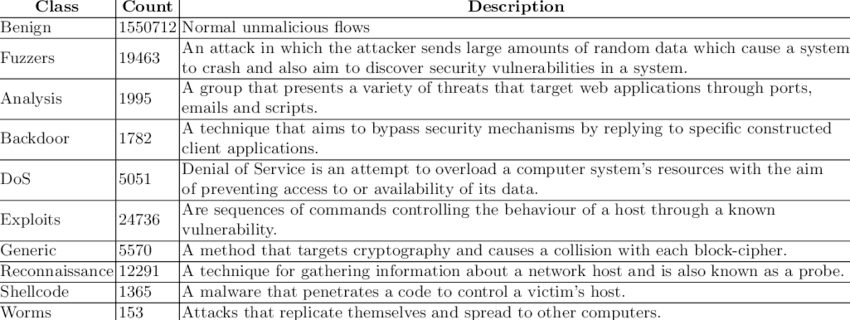
Here are the various classes of malicious traffic used in the dataset:
Ok, cool now what?
Well now let's go create our model. You can leverage your choice of AI to build the Naive Bayes classifier. Alternatively, download the script I generated (with Claude):
 art-of-defence
Here's the help:
nithen@night heatseeker % python3 heatseeker.py -h
usage: heatseeker.py [-h] [--model MODEL] {train,run,live} ...
Bayesian Network Traffic Threat Classifier
positional arguments:
{train,run,live}
train Train the model on labelled CSV datasets
run Classify flows in CSV file(s)
live Capture and classify live network traffic
options:
-h, --help show this help message and exit
--model MODEL Path to model file (default: bayes_model.pkl)
Now we need to train the data, like so:
python3 heatseeker.py train NF-UNSW-NB15-v3.csv --label-column "Attack"
This will produce a model (binary file) called: bayes_model.pkl
The we can run it and see how it performs:
=== Model Summary ===
Total training samples : 2365424
Classes : Benign, Fuzzers, Exploits, Backdoor, Reconnaissance, Generic, DoS, Shellcode, Analysis, Worms
Benign 2237731 samples
Fuzzers 33816 samples
Exploits 42748 samples
Backdoor 4659 samples
Reconnaissance 17074 samples
Generic 19651 samples
DoS 5980 samples
Shellcode 2381 samples
Analysis 1226 samples
Worms 158 samples
[*] Starting live capture on interface: default
Flow timeout : 30.0s
Press Ctrl+C to stop.
[03:04:17] ⚠ THREAT 192.168.1.1:53077 → 31.255.33.19:443 (TCP) class=Reconnaissance conf=67.71% pkts=2 bytes=120
[03:04:20] benign 192.168.1.1:49228 → 31.120.69.21:443 (TCP) class=Benign conf=98.67% pkts=6 bytes=1400
So, it seems to pick up some reconnaissance activity from the get go, interesting:
[03:04:17] ⚠ THREAT 192.168.1.1:53077 → 31.255.33.19:443 (TCP) class=Reconnaissance conf=67.71% pkts=2 bytes=120
How do I train my own model?
Train on a labelled CSV (must have a 'label' column)
python classifier.py train traffic_labelled.csv
Custom label column name
python classifier.py train cicids2017.csv --label-column "Label"
Train on multiple datasets at once (incrementally stacks)
python classifier.py train train1.csv train2.csv train3.csv
Overwrite existing model instead of extending it
python classifier.py train new_data.csv --overwrite
How do I run the model?
Classify flows:
python classifier.py run live_capture.csv
Save results to a new CSV file:
python classifier.py run capture.csv --output results.csv
Ok, now what?
Go create your own datasets, classifications and models to suit your environment.
Conclusion
I'll write an article on the model performance once used it in a live environment - subscribe to be notified.
As always, if I got anything wrong,...

References
The following websites serve as appropriate references for additional detail:
 Tirthajyoti Sarkar
 Abdisalam Mohamed
